SAP PaPM(Profitability and Performance Management) – Overview of PaPM, NODE and Environment Creation Part-1
By Trijotech Team/ January 2023Introduction
In today’s fast-paced business world, enterprises face the constant challenge of monitoring and analyzing their financial performance to stay ahead of the competition. By using SAP PaPM, businesses can perform data analysis with the added benefits of traceability and auditability. Many businesses struggle with managing complex data models that involve multiple sources of data and intricate hierarchies. SAP PaPM can help to simplify this process by providing a unified view of your data, making it easier to analyze and report on.
Here are some examples of industries that can benefit from using SAP PaPM to handle their business challenges:

What is SAP PaPM?
SAP developed SAP Profitability and Performance Management (PaPM), a software solution that helps businesses manage, analyze, and report on their data to optimize their profitability and performance. One of the key advantages of PaPM is its ability to handle large volumes of data within a short processing period.
PaPM uses in-memory computing technology to process large amounts of data in real time. This means that data is stored in memory rather than on disk, allowing for faster access and processing times. In addition, PaPM includes powerful analytics capabilities that can be used to analyze large data sets and identify patterns and trends.
PaPM provides a comprehensive set of tools and functionalities to help businesses understand and analyze their financial and operational data, including data modeling, data mapping, simulation, and advanced analytics. With these tools, businesses can gain a holistic view of their data and easily identify areas for improvement. The user can execute the result of the what-if scenario, and the data can be transferred to other applications and systems.
SAP PaPM is a versatile application, based on the function created in the modeling it will perform. It won’t have any original data, the data can integrate with other applications and systems such as flat file, S/4 Hana, BW and so on, including redundancy-free reuse of data, master data and hierarchies.
The PaPM offers various types of report formats to analyze business and download data. It can be Chart, data grid and value flow. Some of the reports are generated in SAP PaPM.
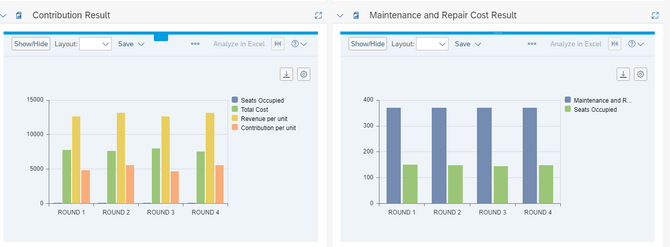
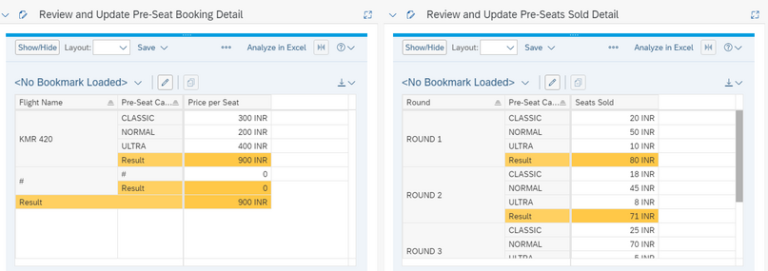
Creation of NODE and Environment In SAP PaPM
NODE is a Container that holds multiple environments. Each environment represents a separate instance of a PaPM model, all the environments will be created under one NODE. By creating multiple environments under a single node, businesses can organize their PaPM models more efficiently and simplify the process of managing and analyzing their data. For example, businesses may choose to create separate environments for different business units, geographic regions, or product lines. In simple words, Environment contains all the functions and processes.
Sample Content
The sample content provided by SAP includes cross-industry and industry-specific environments. SAP’s PaPM solution comes pre-delivered with various industry-specific solutions in the area of profitability and performance management. If your project is related to any of these industries, you can copy the respective environment and reuse it. However, it is important to ensure that the environment you are copying is suitable for your project’s needs. The first letter ‘S’ identifies the industry-specific environments ID, and these come equipped with sample content. If you plan to create a new environment, we recommend avoiding the use of the letter ‘S’ as the first letter of the ID.
Steps to Create:
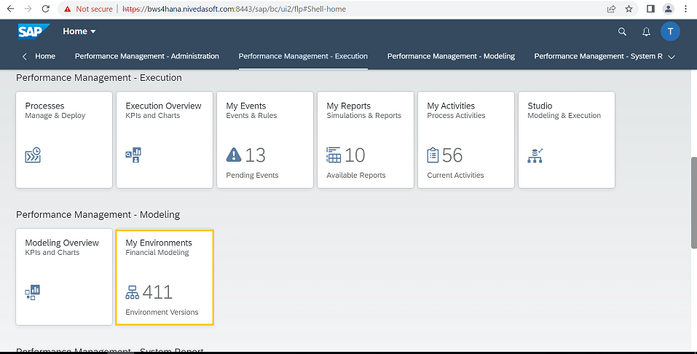
Go to SAP GUI and Click SAP Fiori Launchpad.

The PaPM Fiori tile will open. Ensure all the roles have been added to your user.
For roles assignment information, review SAP PaPM Roles Assignment Help.

Click ‘My Environment’
The environment screen will be visible. Click Edit.
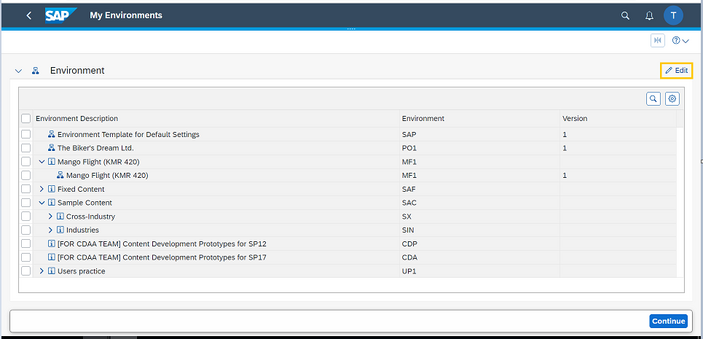
Click ‘Add’ button.
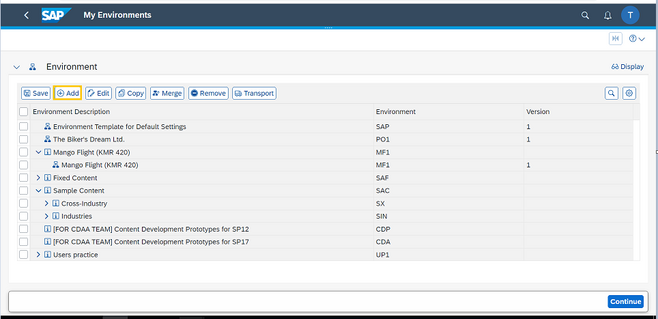
Environment ID: 3 Digit Alpha Numeric ID (Avoid using ‘S’ alphabet in first letter, see)
Environment type: Use NODE Type
Description: Explanation about the project or process.

NODE has been created. Click ‘Save’. Select the NODE as below mentioned capture and click the add button.
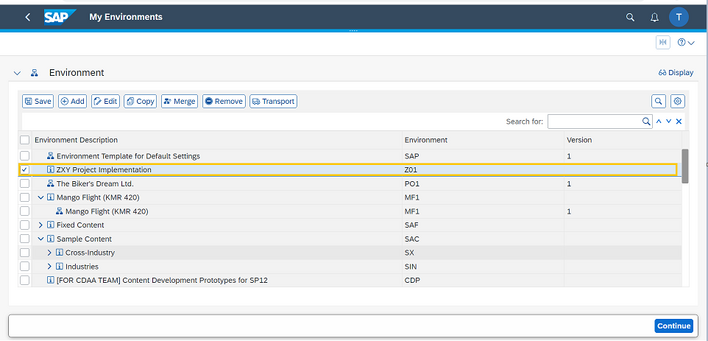
Add Level: The environment should be one level below NODE.
Environment ID: 3-digit alphanumeric value. (Don’t use ‘S’ alphabet in the first letter, see)
Environment Type: Environment Version
Version: Need to specific numeric values for identification of environment version.
Description: Need to specify the text based on the activity.

The Node and Environment has been created.
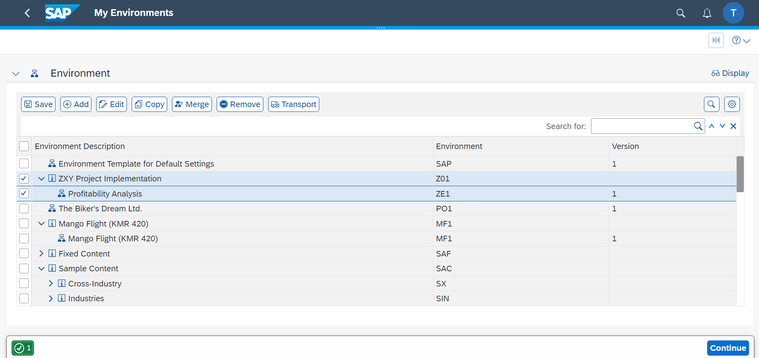
Save and Continue – The Modeler screen has been visible now.

Conclusion
SAP’s Profitability and Performance Management (PaPM) solution is an excellent tool for businesses to gain real-time insights into their financial performance. PaPM enables businesses to monitor and analyze their financial data, identify areas of improvement, and take corrective actions to enhance their profitability.
We hope this blog post has provided you with a comprehensive overview of SAP’s PaPM solution and the creation of NODE and Environment in PaPM.
To read more of our blogs you can surely click here.
Check out other video blogs.
Disclaimer: All the opinions are solely for information purposes, and the author doesn’t recommend or reject any tools. It should be done after your own due diligence.