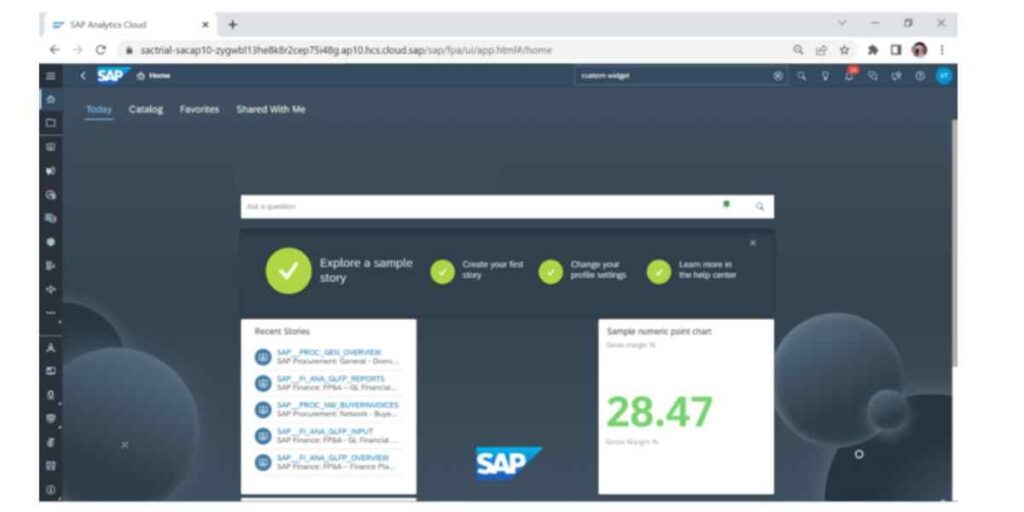
SAP Analytics Cloud (SAC) – Overview
Discover SAP Analytics Cloud (SAC) and how its business intelligence, planning, predictive analytics, data visualization, and integration capabilities enable data-driven decisions.
Introduction
In today’s data-driven world, businesses are constantly seeking ways to gain actionable insights from their vast amounts of data. Are you looking for a cloud-based solution that can help you understand your data, make smarter decisions, and plan for the future? If so, SAP Analytics Cloud (SAC) emerges as a powerful solution. It’s a brawny and versatile analytics platform that empowers organizations by combining business intelligence, augmented and predictive analytics, and planning capabilities in one end-to-end workflow. In this blog post, we will explore the key features and benefits of SAP Analytics Cloud, highlighting how it can revolutionize your data analytics strategy.
What is SAP Analytics Cloud?
SAP Analytics Cloud is a cloud-based enterprise analytics solution, belonging to the SAP BTP platform, that delivers planning, predictive analytics, and business intelligence capabilities in one integrated workflow. It connects to data sources across on-premise and cloud environments, to provide a comprehensive and unified view of your organization’s data. Additionally, it also enables you to connect and analyze data from SAP and non-SAP applications, whether they are live or imported. It also provides you with over 100 ready-made SAP business content packages that cover various lines of business and industries, so you can speed up your analytics and planning projects. It also allows you to collaborate with your teams on plans and budgets, using real-time data and simulations to align your strategies and goals.
Data Sources supported by SAP Analytics Cloud:
Different types of data sources that you can use with SAP Analytics Cloud: You can connect SAP Analytics Cloud (SAC) to many different data sources, both in the cloud and on your own premises.
Some of the data sources that SAC can connect to are:
- SAP BW, SAP Universe, SAP HANA, Google BigQuery, SAP BPC, and SQL-based data sources.
- SAP S/4HANA, SAP BPC Embedded, and SAP Data Warehouse Cloud.
- Cloud applications such as SAP SuccessFactors, SAP Concur, and Qualtrics.
SAC can connect to these data sources using two methods: live connection and data acquisition . Live connection means that the data is retrieved from the source system upon opening or refreshing a story in SAC, while data acquisition means that the data is replicated from the source system into SAC.
For real-time data connectivity options, SAC can use live connection for some of the data sources mentioned above, such as SAP BW, SAP S/4HANA, SAP HANA, SAP Universe, SAP BPC Embedded, and SAP Data Warehouse Cloud. However, not all data sources support live connection, such as SAP SuccessFactors and other cloud applications. In that case, SAC can use SAP Data Warehouse Cloud as a bridge to expand the live connection options via remote connections. SAP Data Warehouse Cloud can connect to a variety of SAP and non-SAP data sources remotely and federate the data in models that can be accessed by SAC in real time.
Open data sources: You can also use SAC with open data sources, such as CSV files, JSON files, and XML files. SAC also supports other data connectors that let you connect to custom data sources that SAC does not support natively. SAP Analytics Cloud (SAC) provides access to various data sources, both on-premises and cloud based.
SAC Architecture in a nutshell:
SAP Analytics Cloud (SAC) is a platform that can do business intelligence (BI), enterprise planning, and predictive analytics by itself. SAP hosts and runs this service fully.
The SAC architecture has three layers:
- The core layer is the base of the SAC platform. It has the SAP HANA database, the SAP Analytics Cloud application server, and the SAP Analytics Cloud web application.
- The data layer lets SAC connect to different data sources, such as SAP applications, data sources on your premises, and data sources in the cloud.
- The user layer is the interface for users to work with SAC. It has the SAP Analytics Cloud web application, the SAP Analytics Cloud mobile app, and the SAP Analytics Cloud SDK.
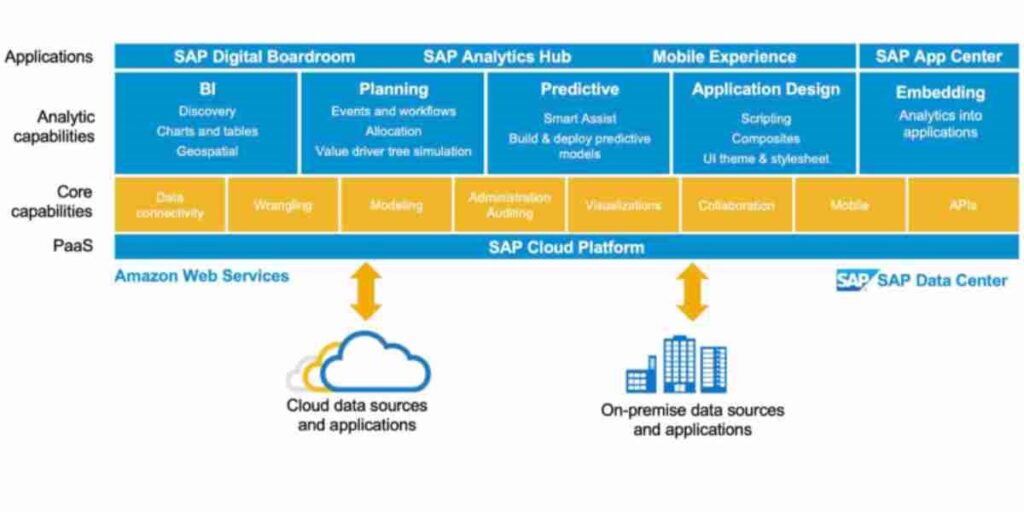
The diagram below shows the main architecture of SAP Analytics Cloud:
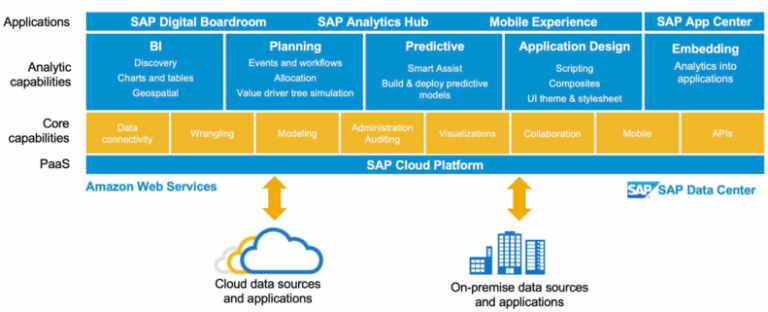
The core layer of the SAC architecture is hosted in SAP’s data centers. The data layer can be hosted in SAP’s data centers, on-premises, or in a hybrid environment. The user layer can be accessed from any device with a web browser.
Key Features:
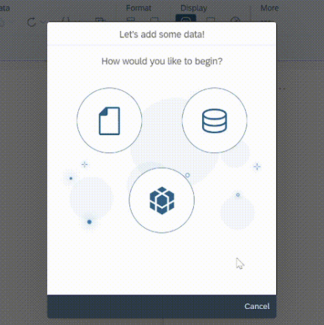
1. Data Integration: SAC facilitates seamless data integration from diverse sources, encompassing SAP systems, databases, spreadsheets, and cloud applications. This enables consolidation of structured and unstructured data for holistic analysis. Data Integration in SAP Analytics Cloud entails linking and analyzing data from a range of sources, including SAP and non-SAP applications, files, or databases. Leveraging the SAP Analytics Cloud Modeler, users can prepare, transform, and model data for analysis and planning purposes. Moreover, the SAP Analytics Cloud add-in for Microsoft Office offers additional functionality for accessing and enhancing data within Excel. Furthermore, integration of SAP Analytics Cloud with SAP S/4HANA Cloud supports planning and reporting objectives.
2. Data Visualization: With SAC’s intuitive drag-and-drop interface, users can create compelling visualizations and interactive dashboards. The platform offers a wide range of chart types, widgets, and formatting options to present data in a visually appealing and meaningful way. One can use various types of charts, graphs, maps, and tables to visualize your data in SAP Analytics Cloud stories and dashboards.
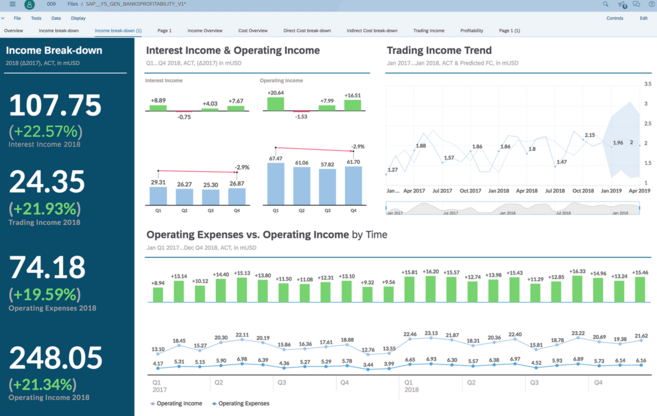
3. Advanced Analytics: Data visualization in SAP Analytics Cloud is the process of creating and displaying graphical representations of your data to communicate insights and trends. SAC goes beyond traditional BI by incorporating advanced analytics capabilities. One can leverage predictive analytics, machine learning algorithms, and natural language processing to uncover hidden patterns, perform forecasting, and make data-driven predictions. You can use various types of charts, graphs, maps, and tables to visualize your data in SAP Analytics Cloud stories and dashboards.
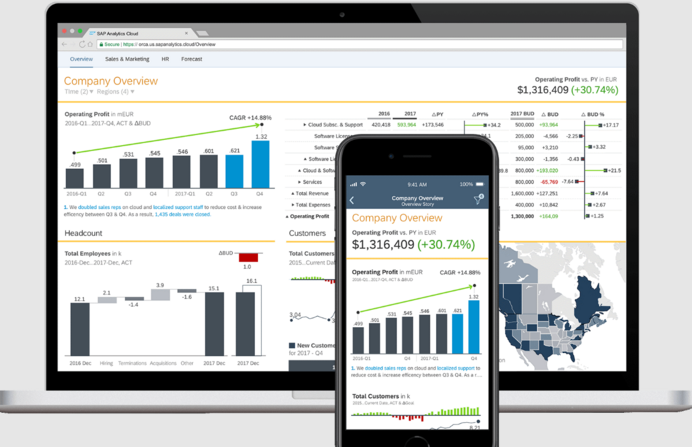
4. Planning and Budgeting: With SAC, organizations can simplify and improve their financial planning processes. SAC offers robust planning and budgeting functionalities, enabling organizations to streamline their financial planning processes. It facilitates collaborative budget creation, what-if scenarios, and variance analysis, helping businesses make informed decisions, which allows different stakeholders to work together on creating and managing budgets, using features like comments and data actions. It also enables businesses to explore diversified outcomes and compare them with their actual results, using features like smart predictions and value driver trees. These functionalities help businesses to gain insights and make data-driven decisions.
5. Collaboration and Sharing: SAC promotes collaboration by allowing users to share visualizations, reports, and dashboards with colleagues and stakeholders. SAP Analytics Cloud provides built-in collaboration tools that make it easy to collaborate on stories. You can collaborate on a story by having a discussion, posting comments or assigning a task. There are two ways to share your story: internally and externally. Real-time collaboration features enable users to annotate, comment, and discuss data within the platform, fostering a data-driven decision-making culture. Sharing and collaboration within teams.
Sharing:
SAC allows you to share your work with others within your team. You can share stories, reports, and other content with specific users or with everyone in your team.
Collaboration:
SAC also provides a number of collaboration features that allow you to work together with your team on the same content. You can comment on stories, reports, and other content, and you can also @mention other users to get their attention.
Annotations and commenting capabilities
Annotations:
SAC allows you to annotate your work with text, images, and other media. Hence, this is a great way to add your own insights and explanations to your work, and it’s also a great way to collaborate with others on the same content.
Commenting:
SAC also allows you to comment on your work and on the work of others. This is a great way to ask questions, share feedback, and discuss your work with others.
These are just a few of the collaborative features that are available in SAP Analytics Cloud. These features can help you to work more effectively with your team, and they can help you to share your work with others.
Here are some additional collaborative features in SAP Analytics Cloud:
Discussions:
You can start discussions with other users to discuss specific aspects of your work.
Tasks: You can create tasks and assign them to other users.
Calendar: You can use the calendar to track your work and to collaborate with others on deadlines.
Benefits of SAP Analytics Cloud
1. Accessibility and Scalability: Being a cloud-based solution, SAC provides anytime, anywhere access to data and analytics. It eliminates the need for infrastructure maintenance and allows organizations to scale resources as per their requirements. SAP Analytics Cloud provides anytime, anywhere access to data and analytics as it is a cloud-based solution. It eliminates the need for infrastructure maintenance and allows organizations to scale resources as per their requirements. This helps businesses achieve operational flexibility by delivering real-time data access and seamless resource management.
2. Self-Service Analytics: Self-service analytics in SAP Analytics Cloud refers to the ability of business users without programming knowledge to create self-service dashboards (SAC Stories) by using the stories and models. This allows users to explore data across the organization and deliver insights at the point of decision. Users can explore data independently, create ad-hoc reports, and gain insights on the fly, enhancing agility and responsiveness. SAC empowers business users with self-service analytics capabilities, reducing their reliance on IT departments.
3. Integration with SAP Ecosystem: SAC effortlessly connects with other SAP products, including SAP S/4HANA, SAP Business Warehouse, and SAP Data Warehouse Cloud, as a part of the greater SAP ecosystem. Real-time data communication is made possible by this integration, which also makes use of already-made SAP technology investments.
4. Security and Data Governance: SAP takes data security and governance very seriously. Role-based access control, data encryption, and compliance with industry standards and laws like GDPR are just a few of the strong security features that SAC provides. Access to sensitive data may be reliably managed and controlled by organisations. When it comes to user authentication and authorization:
- Single sign-on (SSO): SAC works with SSO with different identity providers, such as SAML and OAuth. This lets users sign in to SAC with one set of credentials, which makes the authentication process easier and lowers the chance of unauthorized access.
- Role-based access control (RBAC): SAC uses RBAC to manage access to data and features. This lets administrators create different roles for users, with each role having different access levels.
- Fine-grained access control (FGAC): FGAC lets administrators manage access to specific data items. This is helpful for protecting sensitive data, such as customer PII.
Encryption and data protection methods:
- Data encryption: SAC uses encryption to secure data in transit and at rest. This makes sure that data is safe from unauthorized access and breaches.
- Data masking: SAC supports data masking, which lets administrators hide sensitive data. This is helpful for sharing data with external users without losing its confidentiality.
- Auditing: SAC offers auditing capabilities, which let administrators monitor user activity. This can be used to look into security incidents and to make sure that data is being accessed and used according to company policy.
- Additional security features: SAC also supports other security measures, such as password policies, security alerts, and two-factor authentication. These measures help to secure data from unauthorized access and ensure the safety of the SAC platform.
Use Cases:
- Financial Analysis: SAC enables finance teams to consolidate financial data from multiple sources, perform variance analysis, and create insightful financial reports and dashboards. Finance teams may combine financial data from many sources, carry out variance analysis, and produce meaningful financial reports and dashboards using SAC.
- Sales and Marketing Analytics: SAC empowers sales and marketing teams to analyze customer data, track sales performance, and identify trends and opportunities for revenue growth. SAC gives sales and marketing teams the tools they need to analyse client information, monitor sales progress, spot patterns and chances for revenue expansion.
- Supply Chain Optimization: SAC assists organizations in optimizing inventory levels, forecasting demand, and enhancing overall supply chain effectiveness by integrating data from diverse supply chain systems.
Recent Update features:
Overview of recent updates and enhancements
The latest release of SAP SAC is 2023.03, available for FastTrack customers. QRC customers received this release in Q2 2023.
Some of the new features in this release are:
- Unified Stories and Analytic Applications: The unification of stories and analytic applications into one single artifact based on the optimized story experience. This provides usability and performance improvements, as well as new capabilities such as integrated design time, unified bookmark workflow, flexible theme and CSS, and more.
- Running Totals in Tables and Charts: The support for running total calculations (SUM, Average, Max, Min, Count) in tables and charts in stories. This is useful for tracking cumulative or running key KPIs.
- Planning Workflow Enhancements: The quality improvements on progress/status aggregation and concurrent editing notification for planning processes. This helps to streamline the planning workflow and collaboration among users.
- Data Point Commenting for Live SAP BW: The support for data point commenting for live SAP BW data sources. This allows users to add comments to specific data points in charts and tables and share them with other users.
Upcoming features in upcoming versions:
According to the SAP roadmap, some of the planned features for SAP SAC in 2023 are:
- Integration of SAP Datasphere and SAP SAC: The integration of SAP Datasphere (formerly DWC) and SAP SAC marks a significant advancement, enabling users to seamlessly access and analyze data from various sources within a unified platform.
- Support for Custom Data Sources: The support for custom data sources that are not natively supported by SAC using data connectors. This allows users to connect to any data source that has an API or a JDBC driver.
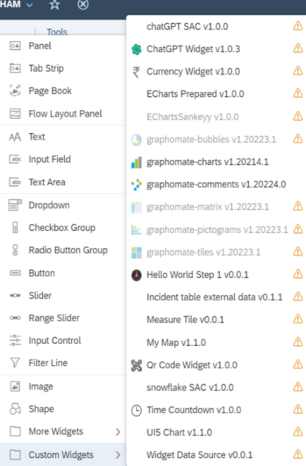
- Enhanced Custom Widgets: The enhancement of custom widgets with data binding, widget dynamic visibility, size and position, and configurable runtime toolbar and context menu. This enables users to create more interactive and customized visualizations in stories and analytic applications.
- Advanced Story Design Features: The support for vertical filter panel, linked widgets diagram, data analyzer integration, last refreshed date and time, dynamic text for BW live data model, scheduling, and mobile support in the optimized story experience. This provides more flexibility and functionality for story design and consumption.
Conclusion
SAP Analytics Cloud revolutionizes information analytics by giving a comprehensive and coordinates stage for information integration, visualization, progressed analytics, and collaborative decision-making. SAC is a powerful and versatile platform that combines analytics and planning with seamless integration to SAP applications and heterogeneous data sources. It enables users to make confident decisions with trusted insights and integrated plans. Optimize your storytelling experience with SAP Analytics Cloud, enabling seamless creation and consumption of stories and analytic applications. Access and visualize data from diverse sources effortlessly, thanks to support for various connectors and custom widgets. Collaborate effectively and streamline planning processes with intuitive planning features. SAP SAC is constantly evolving and adding new features to meet the needs of the customers and the market. SAP SAC is a platform that can help you transform your business with data-driven insights and actions.
With its user-friendly interface, self-service capabilities, and integration with the SAP environment, SAC enables organizations to unleash control of their information and drive better business results. Grasp SAP Analytics Cloud to open new experiences, stay ahead of the crowd, and gain a competitive edge in a data-driven world.
Moreover, you can check our video blog also - SAP Analytics Cloud – Overview. Similarly, to read more of our blogs surely click here .
Disclaimer: All the opinions are solely for information purposes, and the author doesn’t recommend or reject any tools. It should be done after your own due diligence.
Related Topics
#SAP Analytics Cloud#Business Intelligence#Enterprise Planning#Predictive Analytics#Data Visualization#Self-Service Analytics#Data Integration#Analytics Security