SAP BW Automation: Maximizing Efficiency through Automated Process
Explore how SAP BW authorization automation simplifies role and user access management using Excel, VBA, ADSOs, process chains, and automated authorization generation.

Introduction:
Have you been tired of manually maintaining the roles and Authorization to the user id? Now you don’t!
But before proceeding with the solution, let us understand what is the exact function of authorization. Why do we need it?
Authorization Use
Authorization in SAP BW (Business Warehouse) is the process of granting or denying users access to specific data and functionalities based on their roles and responsibilities within the organization. SAP BW provides a comprehensive authorization concept that enables administrators to define and manage user access rights.The authorization concept is based on roles, profiles, and authorizations. Roles are collections of tasks and activities that a user can perform within SAP BW. Profiles define the authorizations needed to execute tasks and activities within a role. Authorizations are the specific permissions granted to a user to access data and functionalities in SAP BW.
To set up Authorization in SAP BW, the following steps can be taken:
- Define roles based on job functions or responsibilities.
- Assign profiles to roles.
- Define authorizations for each profile, specifying which activities and data a user can access.
- Assign roles to users based on their job functions or responsibilities.
It is important to ensure that authorizations are set up correctly to ensure data security and prevent unauthorized access. Regular audits should also be conducted to ensure that user access rights are appropriate and up to date.
There are two types of Authorizations
1. Standard Authorization
2. Analysis Authorization
Standard Authorizations
Standard authorizations in SAP refer to the predefined sets of permissions that are provided by SAP for different modules and functionalities within the system. These standard authorizations are designed to meet the most common business requirements and are divided into various authorization objects that control different aspects of system access, such as data access, transaction execution, and system administration.
The standard authorization objects in SAP are identified by a four-character code and are used to control access to specific functions or data within the system. Some of the commonly used authorization objects in SAP include:
S_TABU_DIS – controls table access
S_TCODE – controls transaction code execution
S_RFC – controls remote function call access
S_DEVELOP – controls access to development objects
S_USER_GRP – controls access to user groups
Standard authorizations are provided by SAP as a starting point for defining user roles and can be used as a basis for creating custom authorizations to meet specific business requirements. However, it is important to ensure that standard authorizations are reviewed and customized to meet the specific needs of the organization to ensure that data security and system access control are maintained.
The graphic below illustrates the structure of the authorizations:

Analysis Authorizations
Analysis authorization in SAP is a type of authorization used in SAP Business Warehouse (BW) to control access to specific data and information. Analysis authorization is used to restrict users’ access to data based on characteristics such as time, location, and organizational units, among others.
An analysis authorization is a collection of settings that specify which data a user can access and what type of activities they can perform on that data. It is designed to work with the reporting and analysis features of SAP BW, such as BW queries, to provide users with a secure and controlled view of data.
Analysis authorization is based on the concept of authorization objects, which are collections of fields or characteristics that are used to define the authorization rules. These authorization objects can be combined into complex authorization roles that can be assigned to users based on their job responsibilities or functional requirements.
An analysis authorization can be defined by specifying the following settings:
- Authorization object – the object to be used to control access.
- Values – the specific values that are allowed or denied for the object.
- Type of access – whether the user can view or modify the data.
- Reporting and analysis authorizations – the specific activities the user is authorized to perform on the data, such as creating reports or viewing query results.
- Analysis authorization provides a flexible and granular way to control user access to data in SAP BW. It is an essential tool for ensuring data security and compliance with data privacy regulations.
Procedure to automate the authorization
Yes! it is possible to automate the authorization. Below is the graphical representation of its architecture.
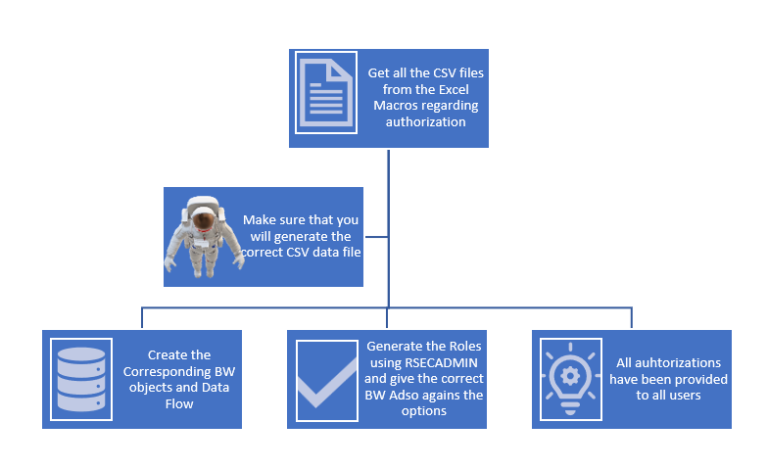
Getting the Data from Excel
For this, we need to maintain the excel file using excel formula, Macros, Master data.
Steps involved –
1. We need to maintain the sub sheet for User id and the Roles.
2. We have to maintain the other sheet which consist of the definition of roles, maintained hierarchy, required restricted info objects field, automated derived column, formula column field which is populating the data from maintained master data.
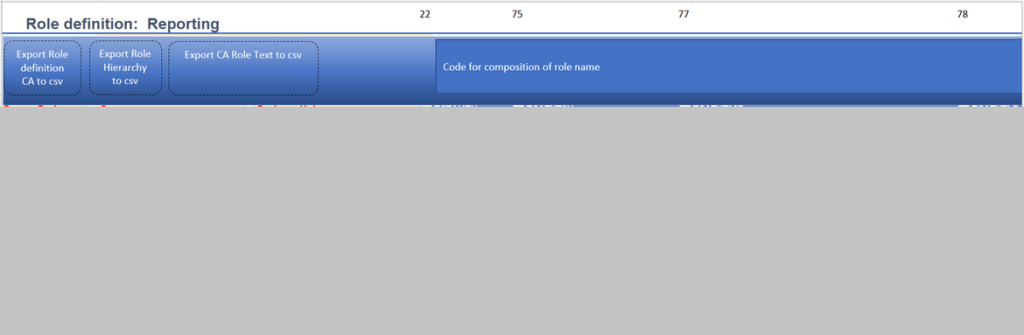
3. Embedded the macros button for generating the csv files.
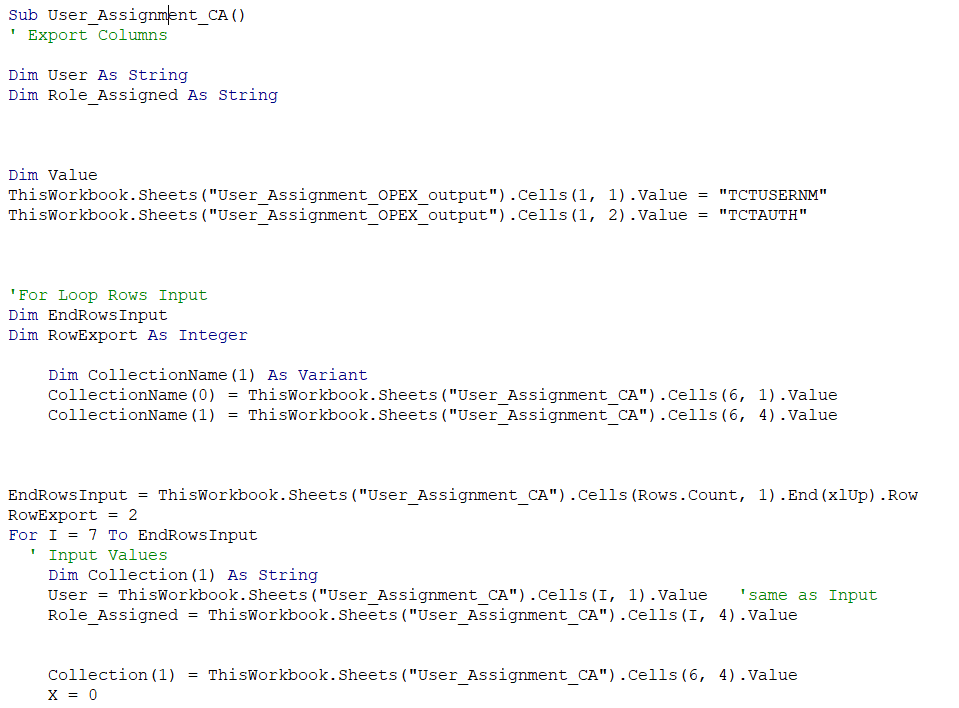
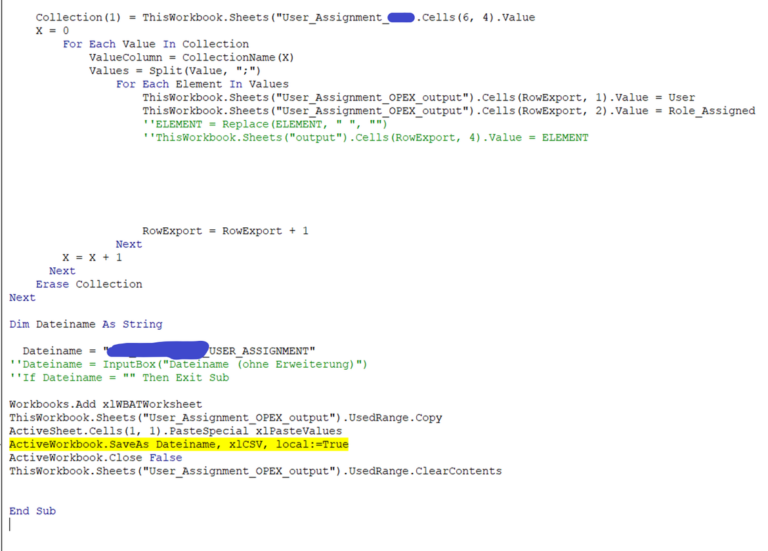
4. Write the VBA codes for Macros.
VBA CODES
1. First of all, we need to enable the developer options for writing Macros.
2. Declare the input and rows export.
3. Write the custom logic for populating data.
4. Save and activate the code.
Populate the CSV file through button
When we click on the button as it executes based on the backend macros and provide us the data file.
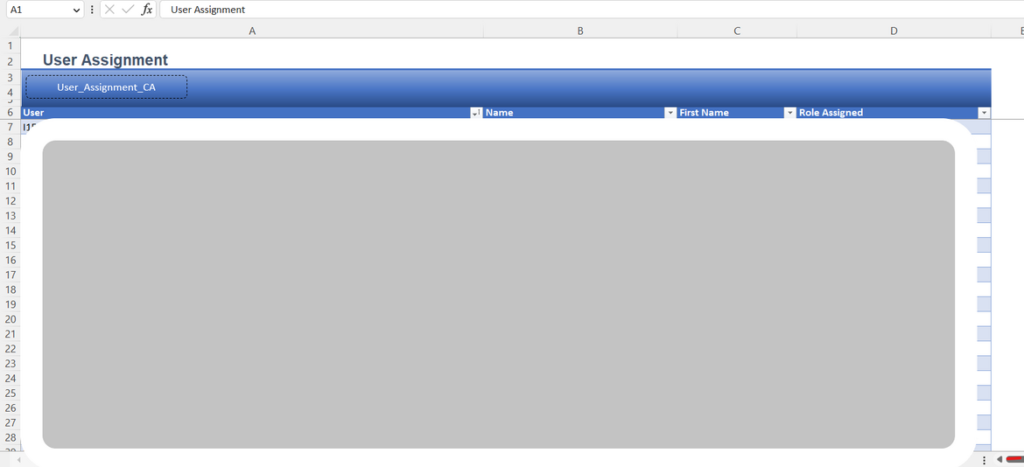
We will be able to see the required listed data.
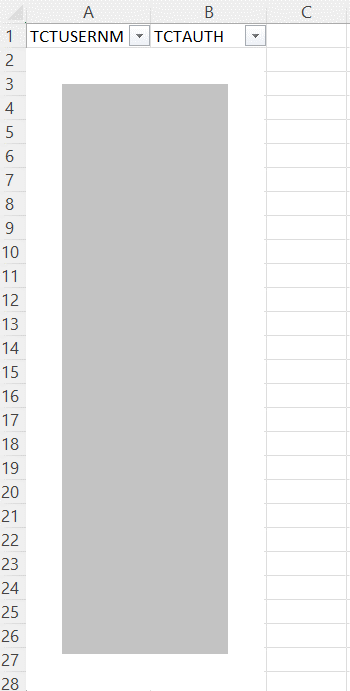
Same steps we have to do for Role Definition, Role Hierarchy and role Text.
SAP BW Environment
We need to create 4 ADSOs and their corresponding Transformation and DTPs.
For Data source we have to create in such way that all the fields corresponding to each CSV files must be available in data source.
Make sure, all these fields are also available in ADSO and map the transformation one to one or customize it using formula and constant (Depend on how you want to see the data at Info-provider level).
Steps to load the data
Through info-package load the CSV file and then load it to the Adso.
Repeat this step for all 4 Adso. We can automate the data load via Process chains.
Data Flow
From the flat file we are loading the data to the Data source and via DTP we are loading it to the above layer. And Data flow will remain the same for other Adso as well.
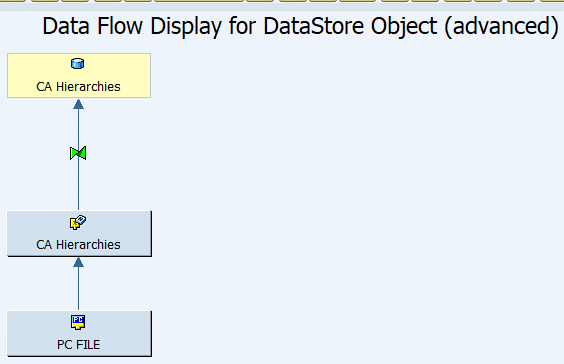
After completion of data loading in all 4 Adso then we need to generate role.
Steps for generating the roles
First, we need to go to the T-code RSECADMIN

Go to the Generation
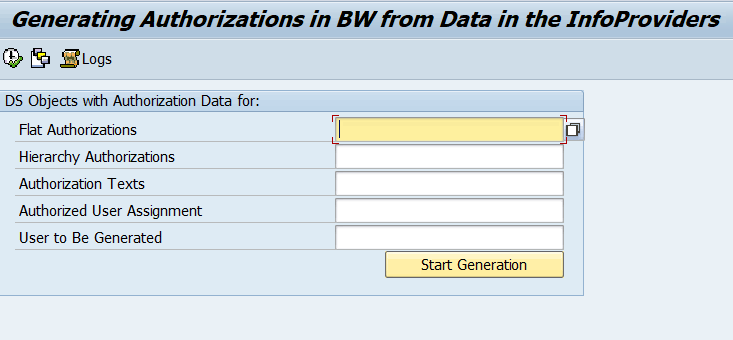
Give the relevant Adso against each parameter.
Click on Start Generation.
After this all of authorization has been assigned to the respective User Id.
If you also want to have some restriction over Queries, then use authorization variable and it has been restricted.
Conclusion
Every data is sensitive and in order to protect or restrict the data is very crucial. We need to focus on the authorization concept so that we can restrict each and every user regarding data consumptions.
Authorization in SAP BW is a crucial aspect of data security and access control. It involves defining roles, profiles, and authorizations to grant or deny users access to specific data and functionalities within the system. Standard authorizations and analysis authorizations are the two types of authorizations available in SAP BW.
Automating authorization can save time and effort by maintaining roles and authorization to user ids using an excel file, macros, and VBA codes. By following the steps involved, data can be loaded efficiently into the ADSOs, ensuring that user access rights are appropriate and up to date.
Overall, implementing and managing authorization in SAP BW is essential for ensuring data security and complying with data privacy regulations.
To read more of our blogs you can surely click here .
Check out other video blogs.
Disclaimer: All the opinions are solely for information purposes, and the author doesn’t recommend or reject any tools. It should be done after your own due diligence.
Related Topics
#SAP BW#SAP BW Authorization#Analysis Authorization#RSECADMIN#SAP BW Automation#ADSO#Process Chains#Data Security